Courses
How to track an antibiotic course on iPhone
An antibiotic, a week of eye drops, a month of iron tablets: a course has a start and an end. DoseMate counts the days or doses for you and keeps each course with its own history.
Updated November 17, 2026 · Free on the App Store · iPhone, iPad and Apple Watch, iOS 15.6+
Why track a course
A course is easy to stop too early when you feel better, or to lose count of halfway through. When the same medicine comes back months later, it also helps to see how the last course went.
In DoseMate, each run of a prescription is a course with its own start, end and dose record. You set when it stops, DoseMate stops reminding you after the last dose, and the course moves to your history. Ending a course never deletes the doses you recorded.
Set when the course stops
Each medicine has a When to Stop setting. Set it when you add the medicine (How to set up a pill reminder), using what your prescriber or the pharmacy label says.
| Option | Use it when the label says |
|---|---|
| After Duration | "For 7 days", "for 2 weeks", "for 3 months" |
| After dose count | "Take 20 doses" |
| When inventory runs out | "Until the pack is finished": enter the amount in the pack |
DoseMate works out the last day from the times, the dose and the frequency you set.
Follow a course, step by step
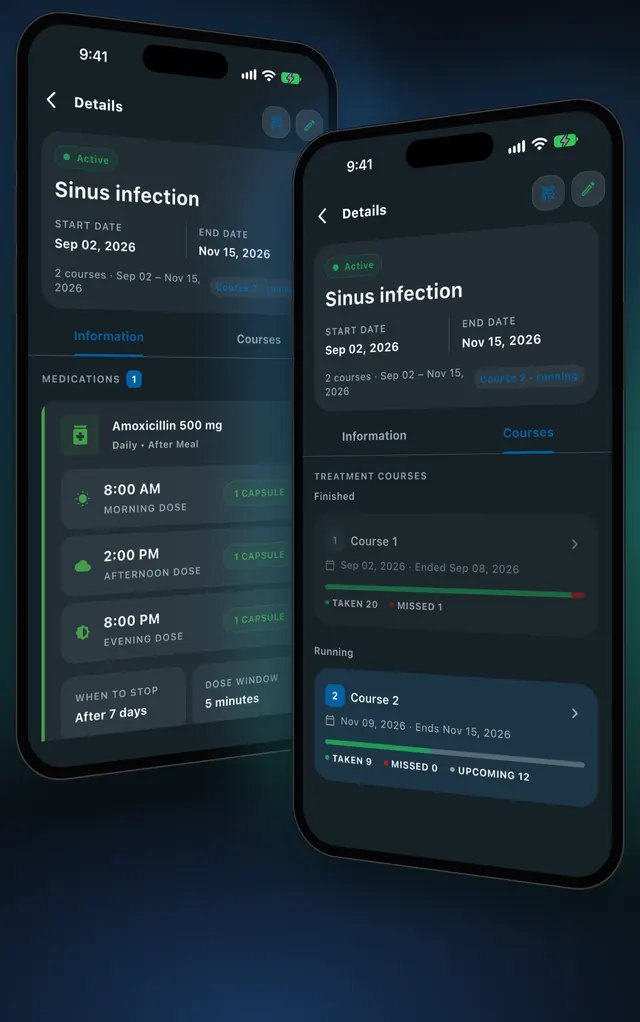
- Tap the Meds tab, then tap the prescription.
- Tap the Courses tab next to Information.
- Find your course under Running. Courses booked for later are under Upcoming, and past ones under Finished.
- Tap a course to see its dates and the prescription it used.
- Tap View full stats to see how many doses you took and missed in that course.
End, restart or start a new course
| Button | What it does |
|---|---|
| End this course | Stops the running course now. Doses already recorded are kept |
| Restart from today | Shown while a course is running. Closes it and starts a new one from today |
| Start new course | Shown when no course is running. You choose the start date and see the Estimated end |
- On the Courses tab, tap End this course, Restart from today or Start new course.
- To end a course, confirm with End this course in the dialog.
- To start one, check the start date (tap Change to pick another day) and tap Start new course.
For a course booked ahead, open it under Upcoming to Change start date or Cancel this course.
When a course is complete
After the last dose, Home shows a Course complete card with the doses you took.
- Tap Start next course if your prescriber gave you another course of the same prescription.
- Or tap Not now to leave it finished.
See your history and compare courses
- On the Meds tab, tap History to see every finished course.
- Tap a course, then Use this prescription again to take the same prescription again.
- On the prescription's statistics, Compare courses appears once it has two or more courses.
Tips
- Count the days with your prescriber's numbers. Enter the duration or dose count exactly as written, not when you expect to feel better.
- Take the record to your appointment. The prescription's PDF report includes the course comparison: Medication log PDF for your doctor.
- Caring for someone? Send them the prescription with a QR code: Share a medication schedule.
DoseMate — Medication Tracker & Schedule
Free · No account · iPhone, iPad and Apple Watch
Frequently asked questions
What happens to my doses when I end a course?
They stay. Ending a course stops its reminders, but every dose you logged as taken or missed is kept in its history and statistics.
Can I restart an antibiotic course from today?
Yes. While a course is running, Restart from today closes it and starts a new one today. Do this only if your prescriber tells you to restart.
Does DoseMate track how many pills I have left?
No. When inventory runs out only sets when the course ends. DoseMate does not count your stock or remind you to refill.
Can a course run with no end date?
No. Every medicine needs When to Stop. When a course ends and you still need the medicine, start the next course.
Is course tracking free?
Yes. Courses, history and the course comparison are free.