Alarm reminders
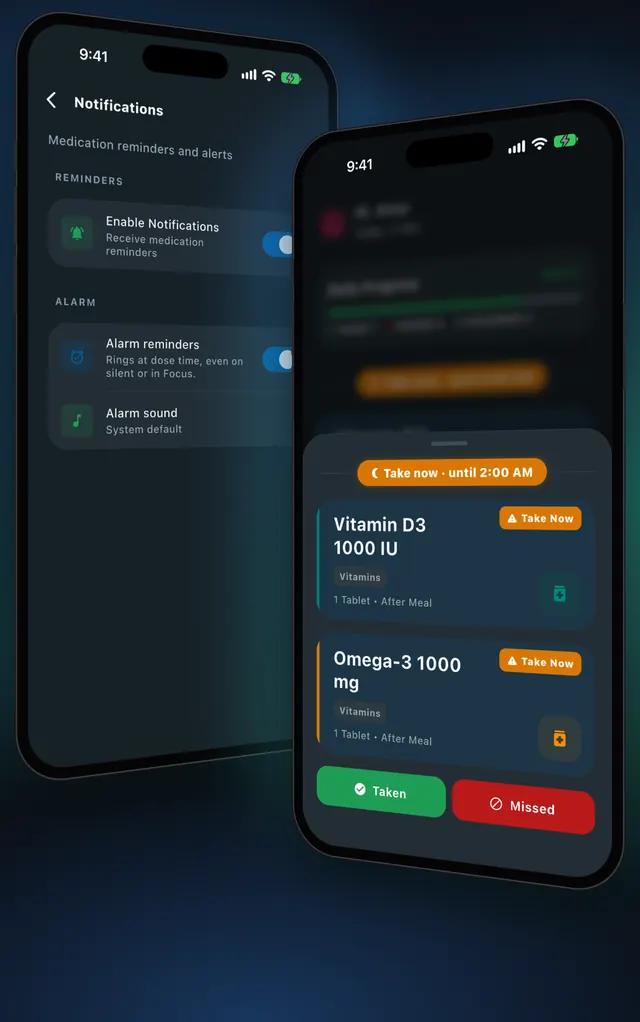
A medication alarm that rings even on silent
An ordinary reminder is easy to miss when the phone is on silent. With DoseMate Pro on iOS 26 or later, each dose can ring like a real alarm until you stop it.
Updated November 17, 2026 · Free on the App Store · iPhone, iPad and Apple Watch, iOS 15.6+
Why an alarm instead of a reminder
Ordinary reminders follow your iPhone's settings: on silent or in a Focus they arrive without a sound, and a dose slips by. For a medicine you must not miss, that is not enough.
DoseMate can turn each dose reminder into an alarm, using the alarm system Apple added in iOS 26. It rings at the dose time even when the phone is on silent or in a Focus, and keeps ringing until you stop it.
| You need | Why |
|---|---|
| iOS 26 or later | Alarms use a part of iOS that older versions do not have |
| DoseMate Pro | Alarm reminders is part of Pro |
| Alarm permission | iOS asks once when you turn it on |
Turn on alarm reminders, step by step
- Set up your medicines first, with their times: How to set up a pill reminder.
- Tap the Settings tab.
- Under ALERTS, tap Notifications.
- In the Alarm section, switch on Alarm reminders.
- When iOS asks whether DoseMate may set alarms, allow it.
- Under Alarm sound, choose System default, Soft chime, Bell or Double beep.
On the free plan the row reads Unlock alarm reminders and opens the Pro page.
If you said no to the permission, DoseMate shows "Alarms are turned off for DoseMate. Allow them in Settings to use this." Tap Open Settings, or open iOS Settings › DoseMate, and allow alarms.
When the alarm rings
- Tap Stop to silence it.
- Or tap View doses. DoseMate opens on the doses that are due, with each medicine and how much to take.
- Log each dose as Taken or Missed, as with any reminder.
While doses are due, a Live Activity shows them. Stopping the alarm does not log the dose: tap Taken in the app once you have taken it.
Tips
- Open DoseMate now and then. DoseMate sets the next 48 doses as alarms, in place of their ordinary reminders. Opening the app tops the list up.
- Choose a sound you will notice. Try each Alarm sound at a time you are near the phone.
- Add your wrist. Dose alerts also reach your Apple Watch: Medication reminders on Apple Watch.

DoseMate — Medication Tracker & Schedule
Free · No account · iPhone, iPad and Apple Watch
Frequently asked questions
Does it work on iOS 18 or older?
No. Alarm reminders need iOS 26 or later, and the option does not appear on older versions. DoseMate still sends ordinary reminders on every supported iPhone, but they follow silent mode and Focus.
Is the alarm free?
No. Alarm reminders is part of Pro. Ordinary reminders are free.
Can I snooze the alarm?
No. DoseMate has no snooze. Tap Stop, then log the dose when you take it.
Does stopping the alarm mark the dose as taken?
No. Open the dose with View doses or from Home and tap Taken. If you do not log it before the end of its dose window, it counts as missed.
Will it ring for every dose?
DoseMate keeps the next 48 doses set as alarms. Later doses are added when you open DoseMate, so open it every few days.